2024 · UX Designer
Sample case studyA dashboard operators actually use
Turning a wall of metrics into a shift-ready control room
A logistics operations team had a dashboard with 42 metrics and no clear answer to the first question of every shift: what needs attention now?
The problem
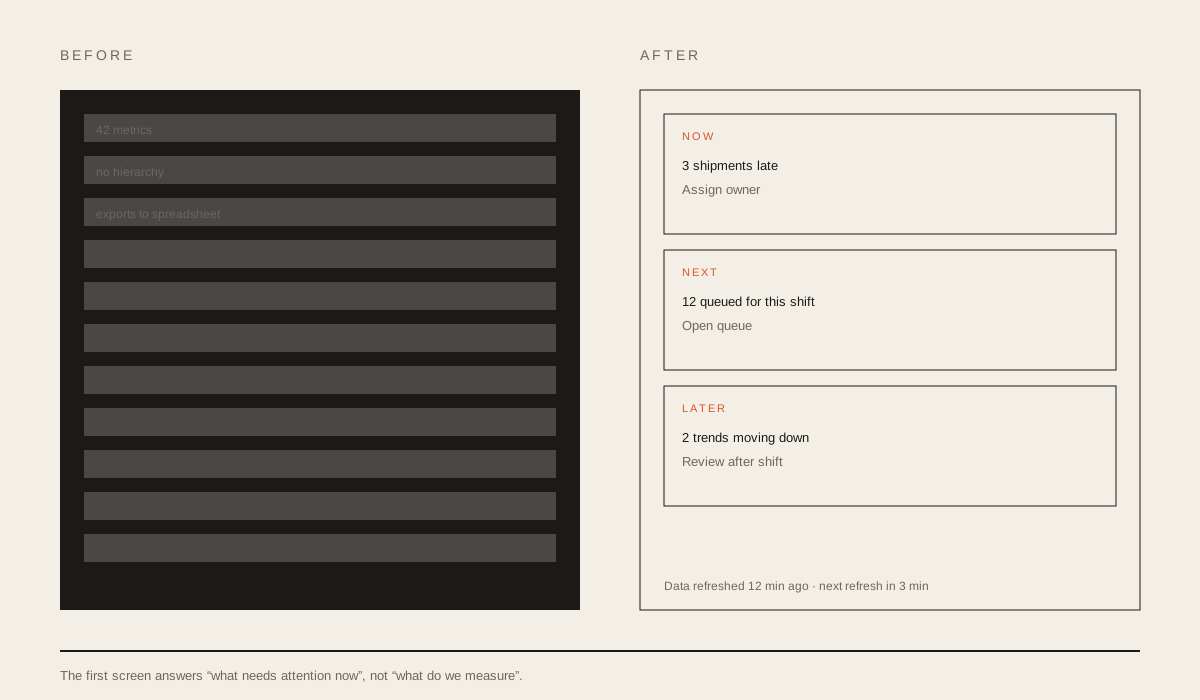
The operations team starts every shift with the same question: what needs attention now? The dashboard answered a different question: what do we measure? It had 42 metrics, four date pickers, and no hierarchy.
Operators had built their own workaround. Every morning they exported the same numbers into a spreadsheet, sorted them by hand, and decided what to do. The dashboard was technically correct and practically unused.
What research changed
I spent two shifts with operators, watching how they worked rather than asking them to explain it. I also reviewed the spreadsheets they had built.
The workaround revealed the real information architecture:
- Now: what is late, blocked, or about to miss a promise.
- Next: what is queued for this shift.
- Later: what is trending in the wrong direction.
The existing dashboard was organised by data source. The operators organised by urgency. That mismatch was the design problem.
“I don’t need more data. I need to know which three things to touch first.” — Operations lead
The decisions that mattered
We replaced the metric wall with three priority lanes. The first screen answers “now”, “next”, and “later”. Everything else moved behind a secondary view.
We made every number actionable. A late shipment count is not useful on its own. The new view pairs each number with the next step: open the queue, assign an owner, or acknowledge the risk.
We designed for the 15-minute refresh. Instead of hiding the delay, the interface shows when the data was last updated and which decisions are safe to make before the next refresh.
We kept the dense table for the people who wanted it. The redesign did not remove detail. It moved detail behind intent.
What shipped
The new dashboard shipped to the operations team first, then to two adjacent teams. The component model was built with the frontend engineer so the priority lanes could be reused for other operational views.
What I’d do differently
I would define the data freshness model with the backend team before designing the states. We treated “last updated” as a UI detail, but it was a product decision that affected trust.
I would also test with a new operator, not only with experienced ones. Experienced operators knew which numbers to ignore. New operators needed the hierarchy to teach them.
Outcome
Time to the first meaningful action fell by 35%, and operators rated the new dashboard 4.4 out of 5 for usefulness.
My contribution
I led the discovery, the information architecture, and the interaction design. I ran the usability sessions and worked with the frontend engineer on the component model.
Constraints
The data pipeline could only refresh every 15 minutes. The team could not add new data sources in this quarter, so the redesign had to work with the metrics that already existed.
Next project